




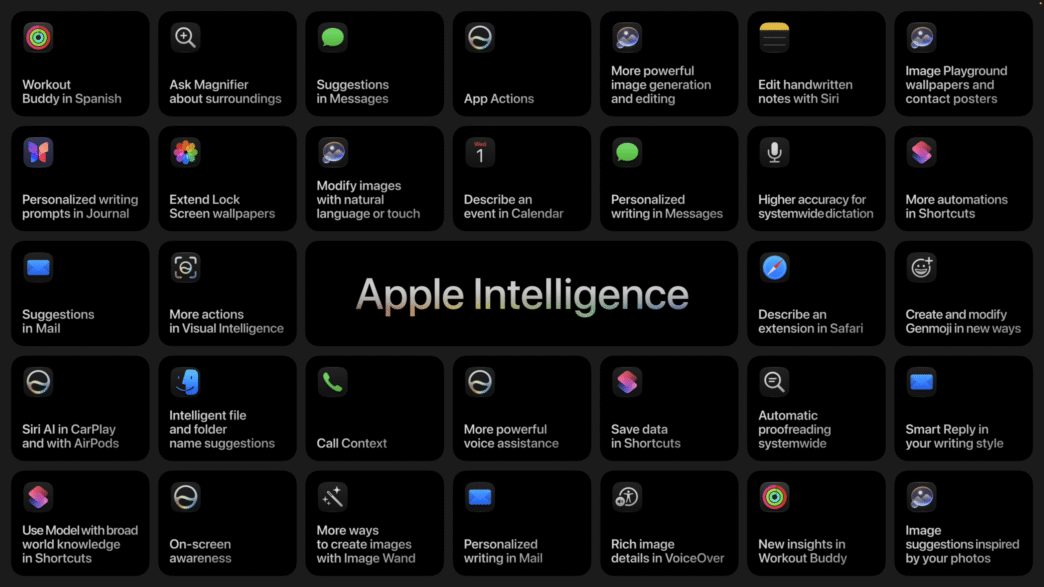
Takeaway: Apple's AI announcements today are grounded in solving real problems, not AI for AI's sake. Their Google partnership gives me confidence the features will actually work. I'm most excited about a Siri that finally works, automatic password updating, and describing Shortcuts to create them. Less excited about generative writing and image generation!
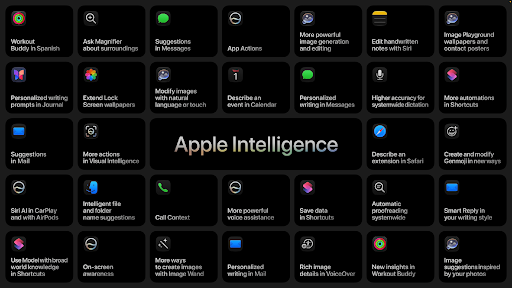
Apple had a bunch of AI-related announcements today and so I wanted to get a newsletter out to share what I'm most excited to try—and also what I'm not so excited to try!
David and I will be chatting about this stuff in the next episode of Intentional AI, too 🙂
What stands out for me with Apple's approach
- They want AI to solve real, practical problems for us. It's cliché to quote Steve Jobs, but this one's great: “You've got to start with the customer experience and work backwards to the technology. You can't start with the technology and try to figure out where you're going to try and sell it.” As a big tech nerd, I think about this idea often. Technology that doesn't solve or support a practical problem is typically just a useless demo. In Apple's keynote, they railed against “AI for the sake of AI” and say they want to see our work “enhanced by intelligence, not replaced by it.” They then proceeded to demo practical problems the technology will solve for the user. It's a great, practical approach—and it fits with their history. A refreshing change from the often-bro-y AI culture.
- They've deeply partnered with Google. You don't have to look far to see how bad Apple is at coding AI models: take Siri, for example, which has been terrible for years. Thank God Apple partnered with Google to be their technical backend for Apple AI. This gives me confidence that the features will actually work this time around.
- Their features are rooted in privacy and our “personal context.” I've got an article coming on the different components of an “AI system”—of which context is a huge component. Context is the data that an AI instance keeps in mind, that it references when you ask it for something. Apple's AI tech is now able to access and reference a great deal of the information on your devices—messages, emails, and photos included. This is fantastic—the more personal context is, the more useful the AI that references it can be. I personally trust Apple more than any of the current AI players to keep privacy in mind with their features (even if you'll eventually have to pay through the nose for them).
Features I'm most excited to try:
- AI tab organization! If you have a ton of tabs open, Apple's Safari browser can now organize all of your tabs by context—in other words, by the problem you're trying to solve. A great win (assuming it works)!
- A Siri that is finally good! (We hope!) A new Siri cannot come soon enough. In its current form, Siri is so functionally useless that my wife and I have nearly stopped using it on our Homepods. I'd be surprised if Siri still sucks come-September—when the new version comes out—given Apple's partnership with Google. I'm very hopeful and will be signing up for the developer beta to give it a shot.
- Automated password updating! Apple has long had a feature where they notify you about which of your passwords have been hacked or compromised. For forever, this has just made me feel guilty about not updating some of my passwords. The latest version of iOS has a feature that will agentically update your passwords on your behalf to new and secure ones.
- You can now customize Siri's voice—including how quickly it speaks and how expressive it is. For me, this solves a very practical problem: Siri talks toooooo sloooooowwwwww. You'll get more hours of your life back! Or at the least, minutes!
- Tasteful photo editing tools. Apple came out with a few new powerful photo editing features. In one, you can change the perspective an image is shot at—if you don't like the angle, Apple Photos will be able to point the camera in a slightly different direction, while filling in the missing parts of the image. To me, this is a tasteful feature—it still captures the memory in the form of a photo, and performs helpful edits without rewriting history.
- Describing Shortcuts to create them. If you don't already use it, Apple's Shortcuts app is immensely powerful. It helps you automate certain tasks on your Mac, iPhone, or iPad. For example, you can load and automatically resize application windows; time block your entire week; or enable certain Focus Modes once you hop onto certain Wifi networks. Come-September, Apple now promises that you can simply describe the shortcut you want to create, and have it create it for you. I can't wait to give this a try—this will also make the new Siri feel even more powerful.
What I didn't like
- The new Image Playground. I personally do not have a use for photographs generated by AI. To me, photos are pictures of things that have happened. There's even a whole saying around this: “pics, or it didn't happen!” Illustrations, too, are in the realm of art—something to be done by humans, not machines. I can see the power of creating images for illustration purposes—for example, to visualize how your bedroom would look with the bed on the other wall. Still, for me the use cases for generating images are few and far between. While they announced a good upgrade to image generation, I can't see myself using it much.
- Generative writing tools. I have a deep, borderline spiritual aversion to AI writing for me (and for the people I talk to). So much so that I begin my most recent book, Intentional, with a statement about how I did not use AI for writing any of the book. I don't care that Siri can write for me now. I'm sure it does a good job. Maybe if I need to email a dozen plumbing companies someday, I'll use it. But right now, I find it gross. I'm comfortable with AI writing so that it can communicate with us humans. But that's the extent of it. All that said, I'm excited to try their new proofreading features—I can see this being practical and useful.
Here's the video of the Keynote today if you want to check out the announcements for yourself!